
Battery Ring
No script needed: a progress ring bound to {battery.level}, text in the middle, and the charging state below.
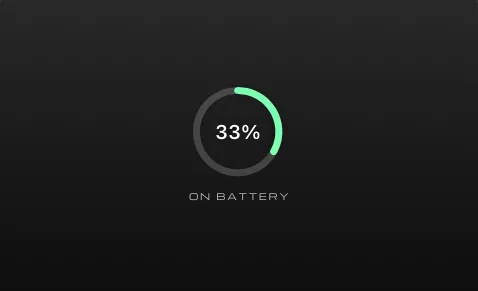
Download Battery Ring.atsuraewidget and drop it on the Widgets section of your Library, or create the files yourself:
{ "$schema": "https://atsurae.app/docs/schema/widget.schema.json", "formatVersion": 2, "id": "battery-ring", "name": "Battery Ring", "summary": "Battery level as a ring, with charging state.", "author": "Atsurae", "version": "1.0", "elements": [ { "type": "progress", "style": "ring", "value": "{battery.level}", "size": [0.09, 0.09], "lineWidth": 0.007, "color": "#7CFFB2", "track": "#FFFFFF30" }, { "text": "{battery}", "font": { "size": 0.02, "weight": "semibold" } }, { "text": "{batteryState|upper}", "font": { "family": "Michroma", "size": 0.009 }, "tracking": 0.2, "opacity": 0.75, "offset": [0, 0.065], "hideWhenEmpty": true } ]}How it works
Section titled “How it works”- The ring and the percentage have the same (default) offset, so the text sits inside the ring.
colorsets the ring’s fill. If someone picks a color for the widget, it replaces this, and the percentage’s color too.{batteryState}is Charging or On Battery, and empty on Macs without a battery;hideWhenEmptyhides the label then.
- Show CPU instead:
{cpu.level}and{cpu}. - Use three rings side by side for battery, CPU and memory.
- Turn the ring red when the battery is low: a second ring with a red
colorand"visibleWhen": "{script.low}", and a script returninglow: context.battery.level < 0.2.