
World Clock
Tokens always use your Mac’s time zone, so the times come from a script using toLocaleTimeString with a timeZone. The layout is two columns: city names aligned left, times aligned right.
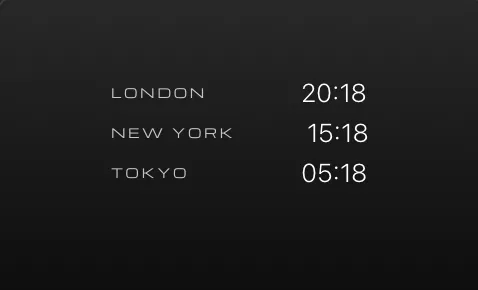
Download World Clock.atsuraewidget and drop it on the Widgets section of your Library, or create the files yourself:
{ "$schema": "https://atsurae.app/docs/schema/widget.schema.json", "formatVersion": 2, "id": "world-clock", "name": "World Clock", "summary": "The time in three cities.", "author": "Atsurae", "version": "1.0", "options": [ { "key": "use24Hour", "label": "24-hour time", "kind": "toggle", "defaultValue": "true" } ], "script": { "file": "script.js", "updateEvery": "minute" }, "elements": [ { "text": "{script.city1|upper}", "font": { "family": "Michroma", "size": 0.013 }, "tracking": 0.2, "alignment": "leading", "offset": [-0.13, -0.04], "opacity": 0.75 }, { "text": "{script.time1}", "font": { "size": 0.026, "weight": "light" }, "alignment": "trailing", "offset": [0.13, -0.04] }, { "text": "{script.city2|upper}", "font": { "family": "Michroma", "size": 0.013 }, "tracking": 0.2, "alignment": "leading", "offset": [-0.13, 0], "opacity": 0.75 }, { "text": "{script.time2}", "font": { "size": 0.026, "weight": "light" }, "alignment": "trailing", "offset": [0.13, 0] }, { "text": "{script.city3|upper}", "font": { "family": "Michroma", "size": 0.013 }, "tracking": 0.2, "alignment": "leading", "offset": [-0.13, 0.04], "opacity": 0.75 }, { "text": "{script.time3}", "font": { "size": 0.026, "weight": "light" }, "alignment": "trailing", "offset": [0.13, 0.04] } ]}// Change these to any IANA time zone names (https://en.wikipedia.org/wiki/List_of_tz_database_time_zones).const cities = [ { name: "London", zone: "Europe/London" }, { name: "New York", zone: "America/New_York" }, { name: "Tokyo", zone: "Asia/Tokyo" },];
function update(context) { const use24Hour = context.options.use24Hour !== "false"; const values = {}; cities.forEach((city, index) => { const time = context.now.toLocaleTimeString("en-US", { timeZone: city.zone, hour: use24Hour ? "2-digit" : "numeric", minute: "2-digit", hour12: !use24Hour, }); values["city" + (index + 1)] = city.name; values["time" + (index + 1)] = time; }); return values;}How it works
Section titled “How it works”- The script returns six values (
city1,time1, …). Each becomes a{script.*}token. context.options.use24Hourarrives as the string"true"or"false".- Names use
"alignment": "leading"at x = −0.13 and times"alignment": "trailing"at x = 0.13, so both columns line up no matter how long each name or time is. updateEvery: "minute"runs it just after each minute changes.
- Change the
citieslist. Time zone names come from the tz database:Europe/Paris,America/Los_Angeles,Australia/Sydney… - Add the day difference: compare
toLocaleDateStringin each zone with your own. - Make the cities options: three
textoptions holding zone names, read fromcontext.options.