
Testing and debugging
Live reload
Section titled “Live reload”Atsurae watches your widgets folder. Within about a third of a second of saving any file in it, Atsurae:
- reads and checks the widget again
- reloads its fonts and images
- restarts its script
- redraws the desktop and every preview
So the fastest workflow is your editor on one side and Customize Widgets on the other.
Problems & Console
Section titled “Problems & Console”Select your widget in Customize Widgets. Below the preview, Problems & Console lists:
- Errors (red): the widget can’t be shown until they’re fixed. Its switch is disabled and its card shows the first error.
- Warnings (orange): the widget works, but something is probably wrong, like a misspelled token or a missing font.
- Console output from your script’s
console.logand friends, with times.
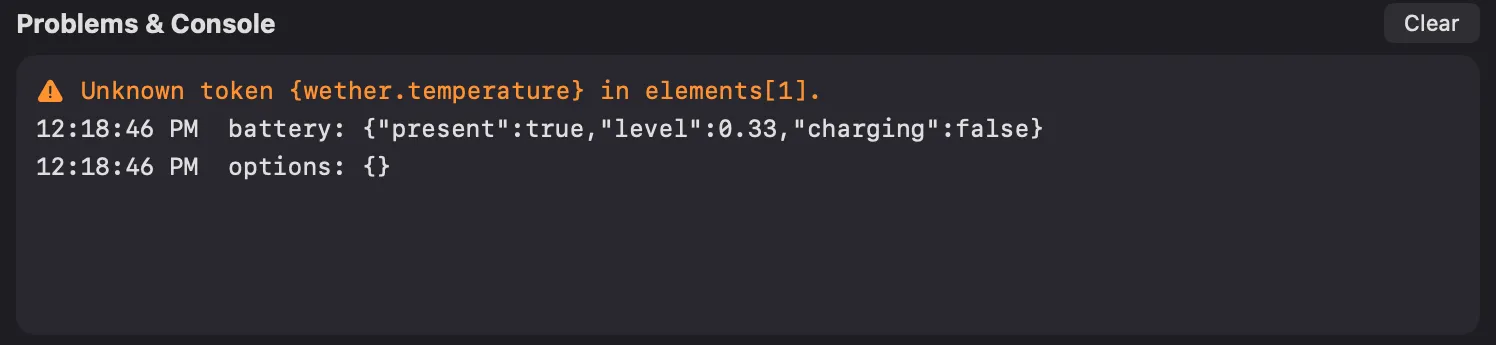
Cards in the Library show a badge with the number of problems; hover over it to read them.
Every message, with its fix, is listed in Errors and warnings.
Common mistakes
Section titled “Common mistakes”| Symptom | Likely cause |
|---|---|
| The file isn’t valid JSON | A missing or extra comma, a missing quote, or curly quotes (“ ”) from a word processor |
| A token shows nothing | A typo (Atsurae warns: Unknown token), or data that isn’t there (no song playing, no battery) |
{script.x} shows nothing |
The script hasn’t returned x, or it stopped with an error; check the console |
| Text is in the wrong font | The family name doesn’t match; see the warning, and check Font Book for the exact name |
| The widget doesn’t appear at all | It’s turned off, or the file isn’t directly in the widgets folder, or it doesn’t end in .json/.atsuraewidget |
| An image is missing | Wrong path in src, or the widget isn’t a package |
| Elements overlap | Offsets too small for the font sizes; see Layout |
Debugging scripts
Section titled “Debugging scripts”Print things. console.log accepts any values and prints objects as JSON:
function update(context) { console.log("now:", context.now.toString(), "options:", context.options); ...}Read the error. When a script fails, Atsurae stops it and shows the error with a line number:
Script error: ReferenceError: Can’t find variable: greting (line 6)
Fix the file and save; the script starts again.
Guard against missing data. context.weather is null until the weather loads, and context.battery.level is null on desktop Macs. Code like context.weather.temperature throws then. Check first.
Test your logic in isolation. Copy your update function into Safari’s JavaScript console and call it with a fake context:
update({ now: new Date(2026, 11, 31, 23, 59), options: { name: "Sam" } })That’s the easiest way to test dates you can’t wait for.
Test checklist
Section titled “Test checklist”Before you share a widget, check it:
- On different wallpapers: bright, dark and busy. See Readable on any wallpaper.
- At different sizes: drag the Size slider from 0.25× to 3×.
- In a different color: pick one in Customize Widgets.
- With every option value.
- Without data: no music playing, before the weather loads, on a Mac without a battery (if you can).
- With long text: Wednesday, September, long song titles, and another language in System Settings ▸ General ▸ Language & Region.
- In 12- and 24-hour time, if it shows times.
- With no problems listed in Problems & Console.
Seeing the real desktop
Section titled “Seeing the real desktop”Previews fill in example values for missing data. To see exactly what the desktop shows, turn the widget on, close the Atsurae window, and look at your desktop.